maplestory.watch
MapleStory Classic Companion
Keep this on top of your game
Your EXP rates as you train, and prices as you set up your store, in a small window over MapleStory.
Market index
Loading the index…
| Item | Open |
|---|
Prices from shops scanned over the last 14 days.
Your alerts
| Item | Typical | Alert at or under | Open |
|---|
MapleStory Classic Companion
This resolution is too small
Below 768 pixels tall, the game shrinks its screen, and blurs the text this tool reads. In the game's settings, pick 1366 × 768, which it draws crisp, or a larger resolution, ideally 2732 × 1536.
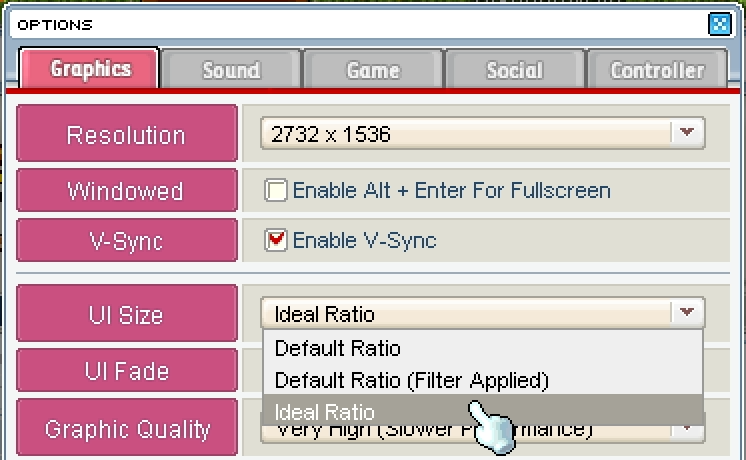
Set the UI Size to Ideal Ratio
At this resolution the game draws its interface at an in-between size, which blurs the text this tool reads. In the game's Options, under Graphics, set UI Size to Ideal Ratio: it makes the interface a little bigger or smaller, so every pixel is sharp.
The minimap is hiding the map's name
At its middle size, the minimap shows only the map, and this tool reads where you are from its name. Press on the minimap to show the name, or to fold it into a bar with the name.
Something is covering the minimap
Something drawn over the game's top-left corner, such as an FPS counter, covers the minimap's title, so this tool can't find it. Drag the minimap a little lower on your screen by its title, or turn off whatever is covering it.
This tool works on a computer
It reads your game window as you play. Open maplestory.watch in Chrome or Edge on the computer you play MapleStory on.
Browse the market Shop prices, their history, and alerts.–
Open Change Channel in game to read it

- Average
- –
- Best minute
- –
- Mesos
- Used
- Picked up
Waiting for a map.
| Monsters | Level | HP | EXP | Spawns |
|---|
Your store will be sent to the index as soon as you open it.
This store won't be sent to the index
This store was not sent to the index
Open forIt was already open when you started sharing. Your store goes up only when this page watches you set it up, so it knows every item in it.
-
Sign in with Discord and whisper a code from . It takes about a minute.
-
Open Change Channel in game
You don't need to switch: opening the window is enough.
-
Open your minimap fully
Press on it until the whole room shows, so your spot can be read.
-
Close your store and set it up again
Keep this page sharing. Your shop will show up soon after you open it.
-
Or leave it open
Your shop will eventually get indexed by one of our members anyway.
Or leave it open: your shop will eventually get indexed by one of our members anyway.
No prices yet.
| Item | Price | Typical | Vs typical | Status |
|---|
Training history
No training yet.
| Details | Map |
|---|
Sessions
No sessions yet.
| Started | Length | EXP gained | EXP / min | % / min |
|---|
Readings
No readings yet.
| Time | Level | EXP | Change | Progress | Map |
|---|
Debug: what the reader sees
Debug: raw video
Found a bug or have an idea? Join us on Discord